Home >
Products >
MeshWorks 1.0
MeshWorks is an advanced mesh
editing software built using the powerful
MeshLib
mesh library. With
MeshWorks you can create, transform and modify meshes very easily.
A mesh is usually created
by exporting a solid model from another CAD system. Meshes created this
way are very difficult to modify and sometimes the very nature of their geometry renders them
useless for further processing. MeshWorks gives you the power to
manipulate meshes so that you can alter their geometry and make them
suitable to your needs.
Download Brochure (300
KB)
Some of the useful
capabilities of MeshWorks are described below
Surface Reconstruction
MeshWorks reads a point cloud from a text file and creates a mesh that
wraps around the points. MeshWorks uses an advanced surfacing
algorithm that accurately approximates the original surface.

Point Cloud of a human brain |
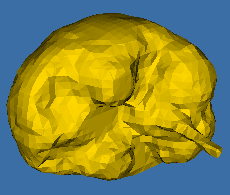
Mesh created from Point Cloud |
Hollow & Offset
MeshWorks hollows a mesh to a specified wall thickness. The hollow
can be internal or external or both. MeshWorks also offsets a mesh internally
or externally.
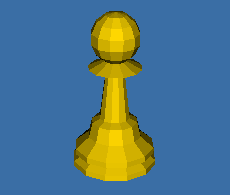
Original mesh |
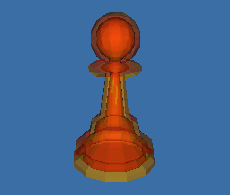
Hollowed mesh (shown with 50%
transparency) |
Stitch Faces
Some CAD systems export meshes with loosely tied faces. The edges of
adjacent faces seem to coincide to the naked eye, but actually there are
minute needle shaped spaces between adjacent faces. MeshWorks
stitches adjacent faces of a mesh together to remove the gaps.
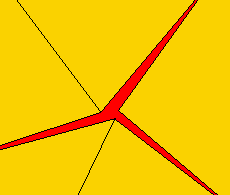
Original mesh (red portion denotes gap
between faces) |
Stitched mesh |
Fill Holes
MeshWorks fills large holes present in a mesh. Holes can occur due to
original geometry or due to other MeshWorks mesh editing commands
such as clipping. Filling holes is essential to make a mesh water-tight.
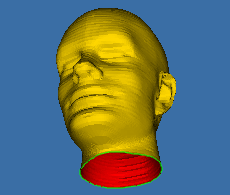
Original mesh with hole |
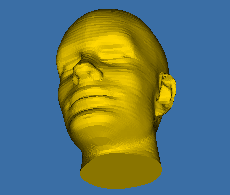
Modified water-tight mesh |
Flip & Unify Face Normals
MeshWorks inverts a mesh by flipping the direction of the face normals. Sometimes the normals of a mesh are not consistent in their
direction. MeshWorks unifies all the face normals so that they point in the same
direction, i.e. inwards or outwards.
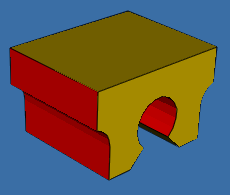
Original mesh (red faces denote wrongly
oriented normals) |
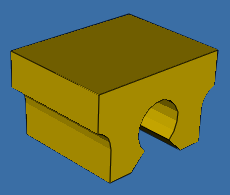
Modified mesh with unified normals |
Sub-Divide Faces
MeshWorks sub-divides each face of a mesh to yield 4 faces to result in a high
resolution mesh.
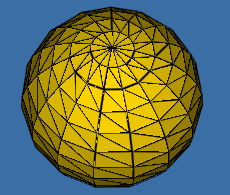
Original mesh |
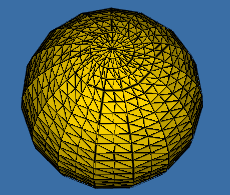
Modified high resolution mesh |
Smoothen
MeshWorks can smoothen meshes with jagged and rough surfaces. This
"relaxes" the mesh and results in faces that are better shaped.
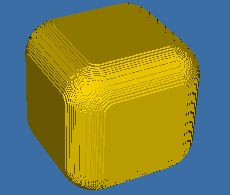
Original rough mesh |
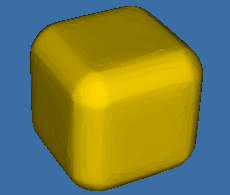
Smoothened mesh |
Decimate
MeshWorks can decimate a mesh to reduce the number of faces. This greatly simplifies large meshes with very high
resolution.
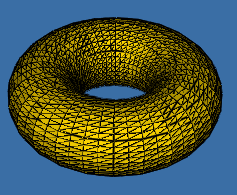
Original high resolution mesh |
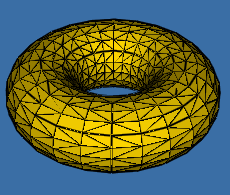
Decimated mesh |
Clip
MeshWorks can clip a mesh to cut away a portion of the
mesh or divide the mesh into two parts by retaining the cut portion.
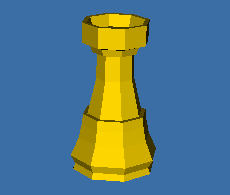
Original mesh |
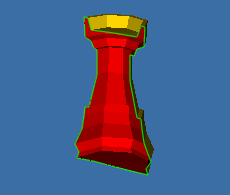
Clipped mesh |
Standard objects
MeshWorks
creates standard objects such as box, sphere, cylinder, cone,
torus and even text.
Measurement
You can measure vertices and distance between two vertices of a mesh.
MeshWorks also calculates mass properties of meshes such as surface area
and volume.
Transformations
You can move, align, rotate, scale, mirror and shear meshes precisely
giving accurate values for the transformation parameters. You can also
move, rotate and scale meshes free hand with the mouse.
Superior 3D
Trackball Style Viewing
MeshWorks lets you view your models with the 3D trackball style
mouse interface. Navigate easily through your drawing using the mouse with
dynamic zoom, pan and orbit.
Colors &
Transparency
MeshWorks allows you to assign colors and transparency to meshes so
that you can see through them. This is very helpful when viewing hollowed
models.
Multiple Projects with Clipboard Support
You can open multiple MeshWorks Project files and work with them
simultaneously. You can cut or copy meshes from one project and paste them
into another.
Print and Print Preview
MeshWorks supports the standard Windows print and print preview
operations.
Import and Export
MeshWorks supports the following file formats:
MeshLib Mesh File Format (.msh)
Stereolithography File Format (.stl)
Alias Wavefront OBJ File Format (.obj)
Click here
to view a snapshot of MeshWorks.
MeshWorks
is priced at 500 USD.
MeshWorks Lite is a
stripped down version of MeshWorks which does not have advanced mesh
manipulation capabilities (The commands in the "Modify" menu are not
available). It offers basic mesh modification and
transformations. MeshWorks Lite is priced at USD 200.
Related Products
|